-
MVC Request Lifecycle
-
When a user visits a webpage built with ASP.NET Core MVC, several internal processes occur before the final HTML page appears in the browser. These processes together form what is known as the MVC Request Lifecycle.
The request lifecycle describes how an incoming HTTP request travels through the ASP.NET Core MVC framework, how it is processed by different components, and how a response is generated and returned to the browser.
Understanding the request lifecycle is important because it helps developers know exactly how MVC applications handle requests, where processing occurs, and how different parts of the framework interact with each other.
What Is the MVC Request Lifecycle?
The MVC Request Lifecycle is the sequence of steps that occur from the moment a user sends a request to the server until the final HTML response is returned to the browser.
Every request in an ASP.NET Core MVC application goes through multiple stages including routing, controller execution, model interaction, and view rendering.
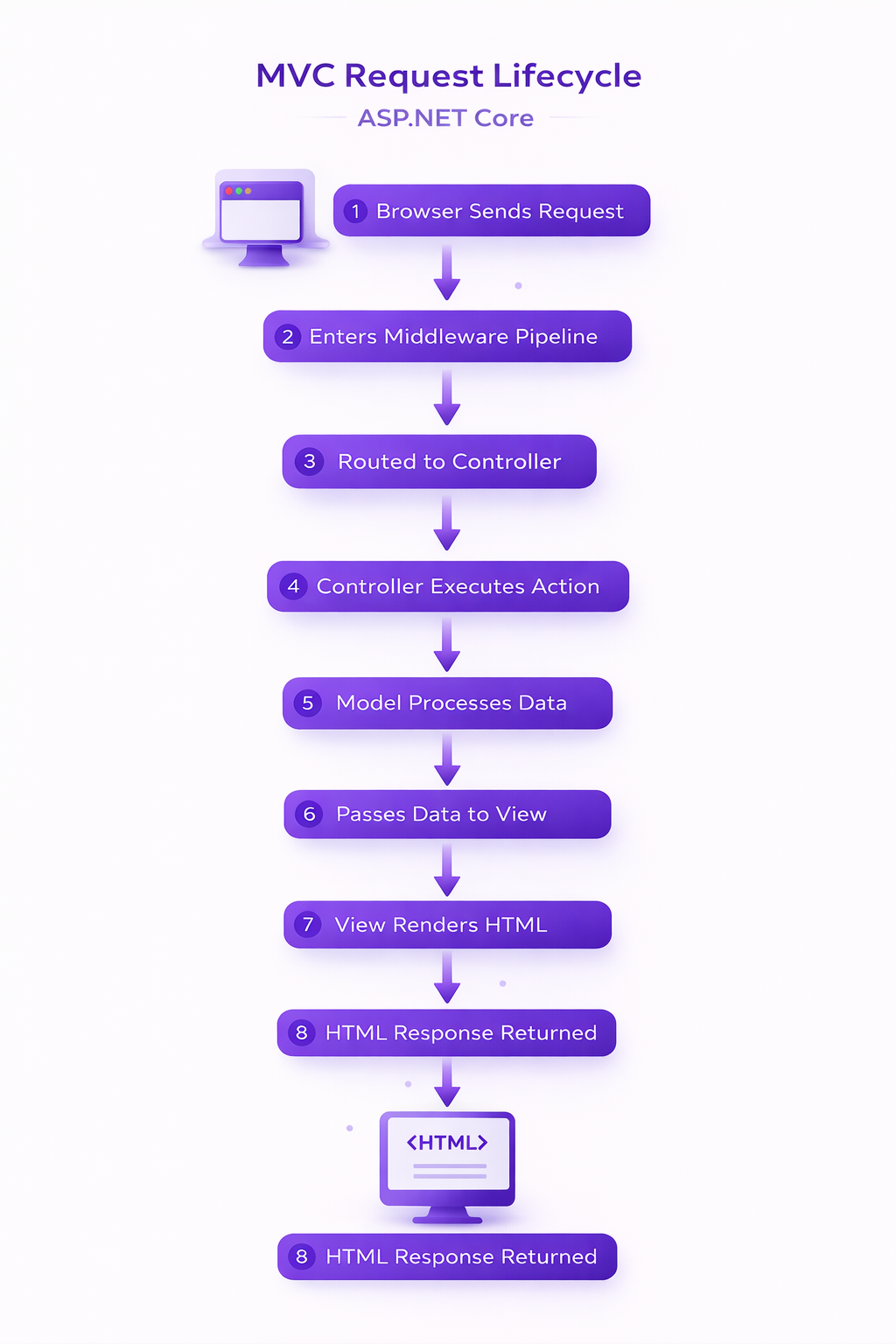
This structured flow ensures that requests are handled efficiently and consistently within the framework.
High-Level MVC Request Flow
At a simplified level, the MVC request lifecycle follows these steps:
- The browser sends an HTTP request to the server.
- The ASP.NET Core middleware pipeline receives the request.
- The routing system determines which controller should handle the request.
- The controller processes the request.
- The controller interacts with the model if data is required.
- The controller sends data to a view.
- The view renders the final HTML.
- The generated response is returned to the browser.
This workflow allows MVC applications to process user requests in a structured and predictable way.
Detailed MVC Request Lifecycle Steps
Let’s explore the lifecycle in more detail.
1. Browser Sends an HTTP Request
The lifecycle begins when a user enters a URL in the browser or clicks a link.
Example request:https://example.com/products/details/5The browser sends this request to the web server hosting the ASP.NET Core application.
2. Request Enters ASP.NET Core Middleware Pipeline
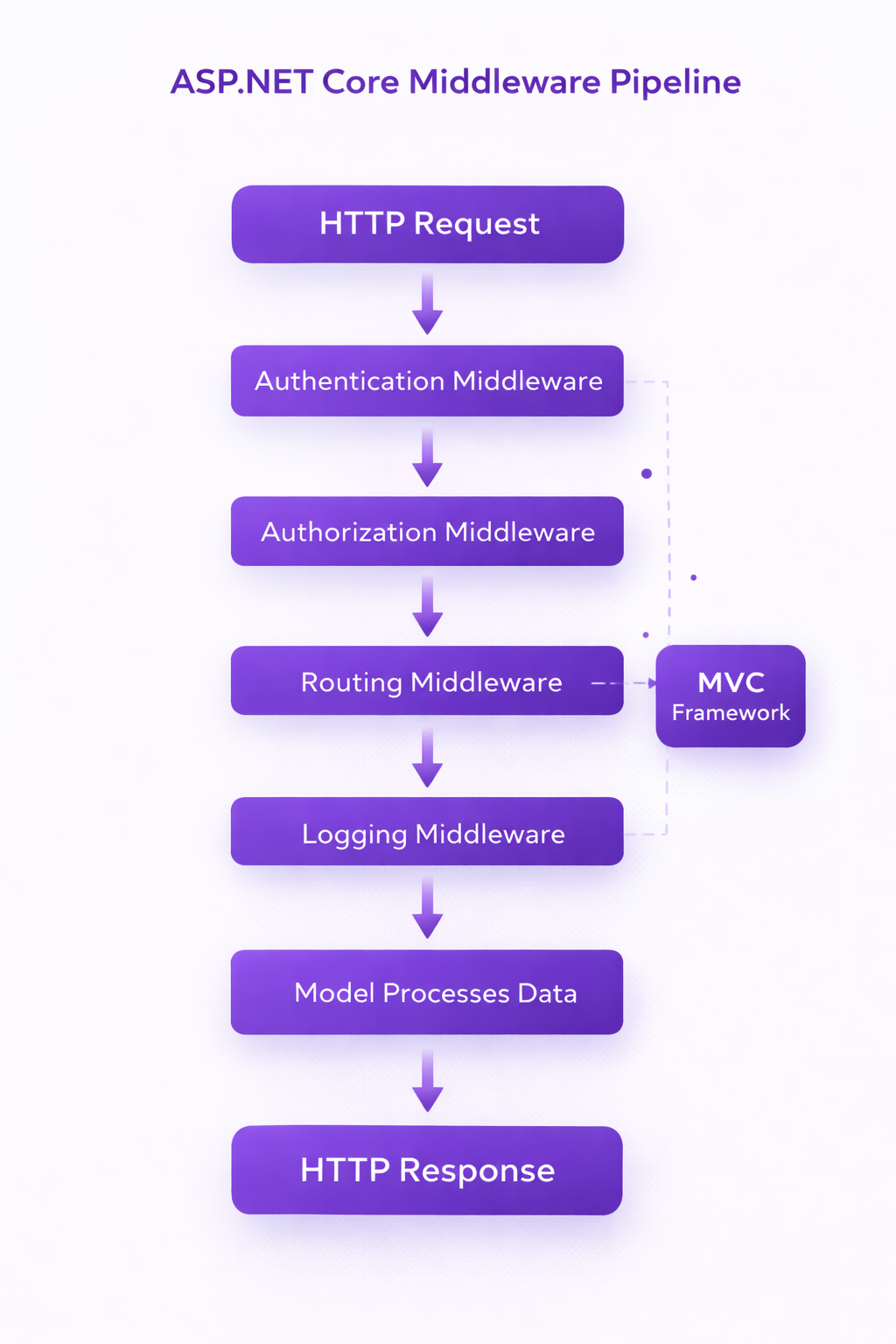
The request is first received by the ASP.NET Core middleware pipeline. Middleware components process incoming requests before they reach the MVC framework.
Examples of middleware include:- Authentication middleware
- Authorization middleware
- Routing middleware
- Logging middleware
Each middleware component can inspect or modify the request before passing it to the next component.
3. Routing Determines the Controller
The routing system examines the URL and determines which controller and action method should handle the request.
Example route pattern:{controller}/{action}/{id?}For example:
/products/details/5This request will be mapped to:
- Controller → ProductController
- Action → Details()
- Parameter → id = 5
4. Controller Action Executes
Once routing identifies the controller, the corresponding action method is executed.
Example:public class ProductController : Controller { public IActionResult Details(int id) { Product product = GetProduct(id); return View(product); } }The controller acts as the coordinator and determines how the request should be processed.
5. Model Processes Data
If the request requires data, the controller interacts with the Model. The model retrieves, validates, or processes application data.
Example model:public class Product { int Id { get; set; } string Name { get; set; } decimal Price { get; set; } }The model returns the requested data to the controller.
6. Controller Sends Data to View
The controller then passes the model data to the appropriate view.
Example:return View(product);The view now receives the model data and prepares the HTML output.
7. View Renders HTML
The view generates the final HTML page that will be displayed in the browser.
Example Razor view:@model Product <h2>@Model.Name</h2> <p>Price: @Model.Price</p>The Razor view engine combines HTML and C# to produce dynamic user interfaces.
8. HTML Response Returned to Browser
Once the view finishes rendering, the generated HTML response is sent back through the ASP.NET Core pipeline and returned to the browser.
The browser then displays the rendered webpage to the user.
MVC Request Lifecycle Summary
Step Description 1 Browser sends HTTP request 2 Request enters middleware pipeline 3 Routing identifies controller 4 Controller action executes 5 Controller interacts with model 6 Controller passes data to view 7 View renders HTML 8 Response returned to browser
Why Understanding the Request Lifecycle Matters
Understanding how requests flow through the MVC framework helps developers:
- Debug applications more effectively
- Understand where logic should be implemented
- Improve application performance
- Design better architecture for large systems
Once developers understand the request lifecycle, they can easily identify where routing, controllers, models, and views fit within the application's execution flow.
Summary
The MVC Request Lifecycle explains how ASP.NET Core MVC processes user requests from start to finish.
- The browser sends a request.
- Middleware processes the request.
- Routing selects the controller.
- The controller interacts with models.
- The view renders HTML.
- The response is returned to the browser.
This structured lifecycle ensures that ASP.NET Core MVC applications remain organized, scalable, and efficient.