-
ReactJS Component Lifecycle
-
React Class Components have a powerful mechanism called the Component Lifecycle. This lifecycle controls what happens from the moment a component is created, updated, and finally removed from the DOM. Understanding lifecycle methods is essential for building real-world React applications, handling API calls, managing subscriptions, optimizing performance, and writing clean, predictable code.
What Are React Lifecycle Methods?
React Lifecycle Methods are special functions inside class components that allow you to run code at specific moments in a component’s life.
A class component passes through three major phases:
Lifecycle methods allow you to run code before render, after render, or when the component disappears.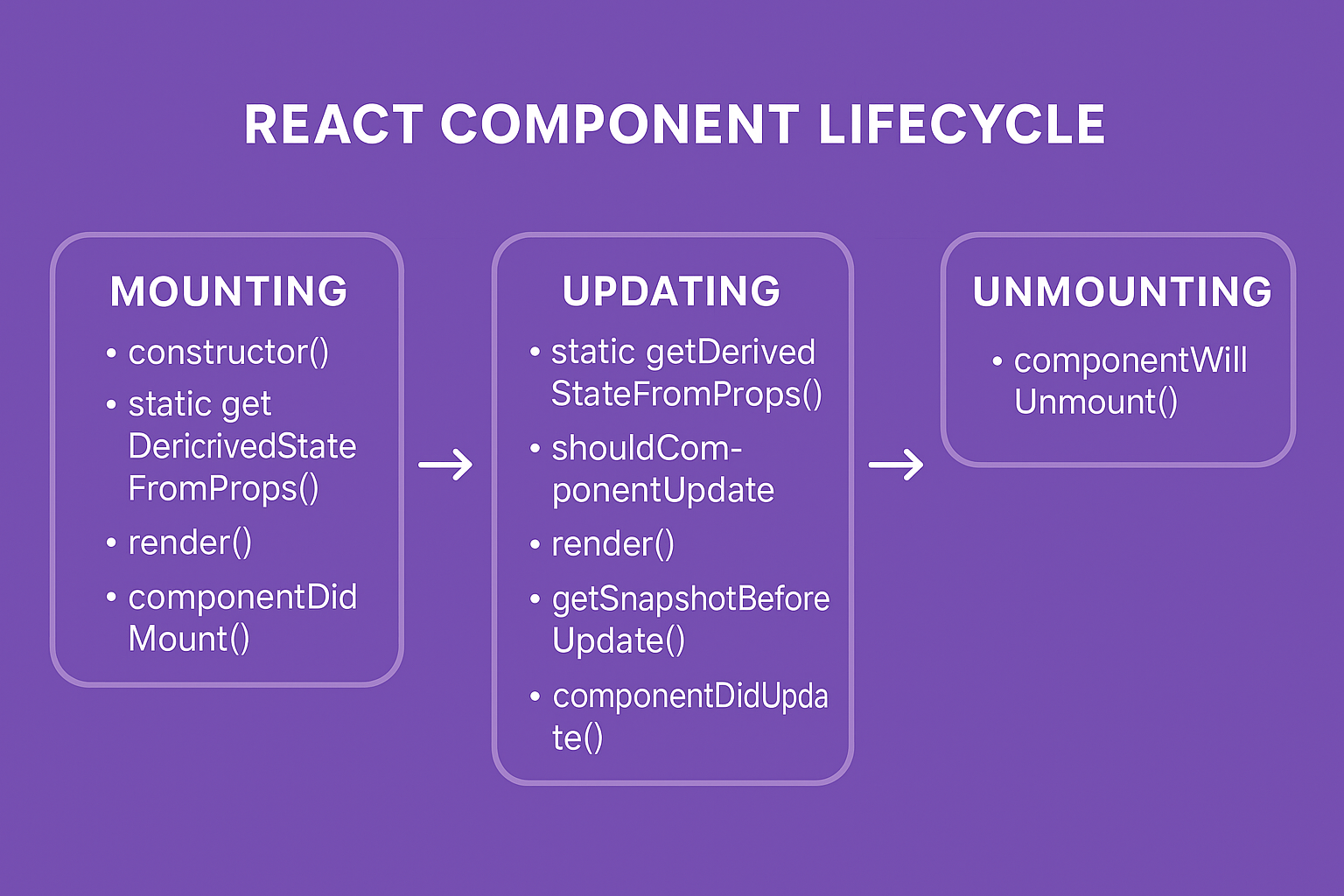
1. Mounting Phase (Component Appears on the Screen)
Mounting happens when a component is first created and inserted into the DOM. This is where initialization and setup processes take place.
Lifecycle Methods in Mounting:
- constructor()
- static getDerivedStateFromProps()
- render()
- componentDidMount()
1.1 constructor()
The
constructor()method is the first step in a component's life. It prepares the component for initial rendering by setting up the state and binding functions. This ensures the component has all necessary values and methods before it appears on the screen.Why It’s Used:
- Initialize this.state
- Set default values
- Bind methods (if not using arrow functions)
constructor(props) {
  super(props);

  // initialize state
  this.state = {
    count: 0,
    theme: "light"
  };

  // bind methods
  this.increment = this.increment.bind(this);
}
1.2 static getDerivedStateFromProps(props, state)
It is a static, pure, side-effect-free method that allows the component to update its state whenever props change.This static method syncs state with incoming props before the component renders. It does not have access to
thisand is rarely used, except in cases where state must always stay aligned with props.Why is it called “static”?
Because React does not call it on a component instance. It must rely only on
propsandstatearguments.- No access to
this - No access to instance properties
- No ability to call
this.setState()
getDerivedStateFromProps()must return:- An Object - To update the state
- Null - If No state update is needed(If the prop never changes → method returns null)
static getDerivedStateFromProps(props, state) {
  if (props.mode !== state.mode) {
    return { mode: props.mode };
  }
  return null;
}
1.3 render()
The
render()method is the heart of every React class component. If you understand render(), you understand the core philosophy of React — because React’s entire UI generation process begins right here.What is render method
render() is a mandatory lifecycle method in every React class component. It tells React what UI should appear on the screen.
Think of render() like a blueprint that React uses to convert your JSX into Virtual DOM
Syntax:class Welcome extends React.Component { render() { return ( <div> <h1>Hello, React!</h1> </div> ); } }If you forget the
render()method, React throws an error.React calls render() every time:
- state changes
- props change
- parent re-renders
1.4 componentDidMount()
componentDidMount()is one of the most important and most commonly used lifecycle methods in React Class Components. If you work with APIs, DOM operations, subscriptions, timers, animations, or third-party libraries — this lifecycle method is your best friend.componentDidMount()is a lifecycle method that fires immediately after a component is added (mounted) to the DOM. It runs only once in the entire lifecycle of a component, after the initial render.Why It’s Used:
- Fetch API data
- Start intervals or timers
- Add event listeners
- Initialize charts, maps, sliders
class Users extends React.Component {
  constructor(props) {
    super(props);
    this.state = { users: [] };
  }

  componentDidMount() {
    fetch("https://jsonplaceholder.typicode.com/users")
      .then((res) => res.json())
      .then((data) =>
        this.setState({ users: data })
      );
  }

  render() {
    return (
      <ul>
        {this.state.users.map((user) => (
          <li key={user.id}>
            {user.name}
          </li>
        ))}
      </ul>
    );
  }
}
2. Updating Phase (Component Re-renders When Data Changes)
The Updating Phase in React occurs every time a component needs to re-render. This happens when:
- The component’s state updates
- The component receives new props
- The parent component re-renders
- A forced update occurs
During this phase, React recalculates the UI and determines how to efficiently update the DOM. React provides five lifecycle methods in the Updating phase:
- getDerivedStateFromProps()
- shouldComponentUpdate()
- render()
- getSnapshotBeforeUpdate()
- componentDidUpdate()
2.1 static getDerivedStateFromProps(props, state)
Now lets clear the confusion first. Yes
getDerivedStateFromProps()method runs in both Mounting and Updating because react must evaluate whether the internal state needs to be synchronized with props every time it renders, not just on the first render. It is a “bridge method” that ensures consistent state during:- Initial load
- Prop updates
- Parent re-renders
This makes it the only lifecycle method intentionally shared by both phases.
Note: Why it is used and How it must be implemented is already discussed in Mounting phase above.
2.2 shouldComponentUpdate(nextProps, nextState)
This method gives you fine-grained control over when your component should re-render.
shouldComponentUpdate()is a React class lifecycle method that determines whether a component should re-render when:- its props change
- its state changes
By default, React re-renders a component every time state or props update. But sometimes this is costly.
shouldComponentUpdate()lets you stop unnecessary renders.Why Is shouldComponentUpdate() important?
Because it:
- Improves performance
- Avoids re-render storms
- Prevents expensive operations
- Helps optimize large UI trees
- Gives manual control to developers
Example: Prevent Re-render If Data Didn’t Change:shouldComponentUpdate() { return true; }
Here:class Counter extends React.Component { state = { count: 0 }; shouldComponentUpdate(nextProps, nextState) { return nextState.count !== this.state.count; } render() { return ( <h1>{this.state.count}</h1> ); } }- If count stays the same → no re-render
- If count changes → component updates
2.3 render()
(Same method, re-runs during updating phase also)
2.4 getSnapshotBeforeUpdate(prevProps, prevState)
getSnapshotBeforeUpdate()is a specialized lifecycle method that runs right before React updates the DOM. It allows the component to capture information from the UI before any changes happen—such as scroll positions, element sizes, cursor position, or the previous layout. Whatever you return from this method becomes thesnapshotargument incomponentDidUpdate().It Runs:
- After
render() - Before DOM is updated
- Before
componentDidUpdate()
Real-World Scenario Explanation
Imagine a chat application where new messages load at the bottom. When new data is added, you want to preserve the user's scroll position so the UI doesn’t jump.
getSnapshotBeforeUpdate()allows you to capture:- current scroll height
- current scroll offset
- element height
- before React updates the DOM.
getSnapshotBeforeUpdate(prevProps, prevState) {
  // Capture the scroll height, before updating
  if (prevProps.list.length !== this.props.list.length) {
    return this.listRef.scrollHeight;
  }
  return null;
}
Full Real Project Example – Chat App Scroll Preservation
class ChatWindow extends React.Component {
  constructor(props) {
    super(props);
    this.chatRef = React.createRef();
  }

  getSnapshotBeforeUpdate(prevProps, prevState) {
    // Capture scroll height before updating
    if (prevProps.messages.length < this.props.messages.length) {
      return this.chatRef.current.scrollHeight;
    }
    return null;
  }

  componentDidUpdate(prevProps, prevState, snapshot) {
    // Restore scroll position after update
    if (snapshot !== null) {
      this.chatRef.current.scrollTop =
        this.chatRef.current.scrollHeight - snapshot;
    }
  }

  render() {
    return (
      <div
        ref={this.chatRef}
        className="chat-box"
      >
        {this.props.messages.map((msg, index) => (
          <p key={index}>
            {msg}
          </p>
        ))}
      </div>
    );
  }
}
2.5 componentDidUpdate(prevProps, prevState, snapshot)
componentDidUpdate()is a post-update lifecycle method that runs immediately after a component has re-rendered and the DOM has been updated.
Syntax Example:componentDidUpdate()is essential in real-world React applications because it allows you to execute logic after the component has visually updated. This is especially useful when your actions depend on the final rendered output.componentDidUpdate(prevProps, prevState, snapshot) { if (snapshot !== null) { this.listRef.scrollTop = snapshot; } if (prevProps.userId !== this.props.userId) { this.fetchUser(); } }- prevProps → The previous props before update
- prevState → The previous state before update
- snapshot → Value returned from getSnapshotBeforeUpdate()
3. Unmounting Phase (Component Removed From Screen)
The Unmounting Phase is the final stage of a React class component’s lifecycle. This phase is triggered when a component is about to be removed from the DOM.
A component may be holding active processes such as timers, subscriptions, event listeners, background tasks, or open network connections. If these are not cleaned up properly, they can lead to memory leaks, performance degradation, unnecessary API usage, and unexpected UI behavior.
React provides one lifecycle method dedicated to this cleanup:
- componentWillUnmount()
componentWillUnmount()
componentWillUnmount()is a lifecycle method that executes immediately before a component is removed from the screen. This method is designed to clean up anything the component created during its lifespan — such as intervals, event listeners, network streams, or subscriptions. It ensures that once a component disappears, it does not leave behind any background processes that continue running silently..This method does not run during the initial render or regular updates — it only runs during removal.
Basic Syntax:
Real World Example:componentWillUnmount() { // cleanup logic }
Leaving a socket open wastes network resources and may create ghost connections.componentDidMount() { this.socket = new WebSocket("wss://demo.example.com"); } componentWillUnmount() { this.socket.close(); }
Conclusion
React Lifecycle Methods give developers deep control over how a component behaves throughout its existence. From initialization and API requests in the mounting phase to DOM measurements and updates during the updating phase, and cleanup operations in the unmounting phase — lifecycle methods remain essential for real-world React development.