-
Common Language Runtime in .NET Core
-
The Common Language Runtime (CLR) is the execution engine of .NET Core.
It is responsible for:- Loading applications
- Executing code
- Managing memory
- Enforcing type safety
- Exceptions handling
- Optimizing performance at runtime
Understanding CLR internals helps developers and architects reason about performance, memory usage, scalability, stability, and runtime behavior.
What Is the CLR in .NET Core?
The CLR (Common Language Runtime) is an execution environment that runs .NET applications.
It provides a controlled environment where:- Code is executed safely
- Memory is automatically managed
- Runtime optimizations are applied
- Hardware and OS differences are abstracted
Unlike traditional native applications (like C or C++), .NET applications do not interact directly with the operating system — all execution flows through the CLR.
High-Level CLR Architecture
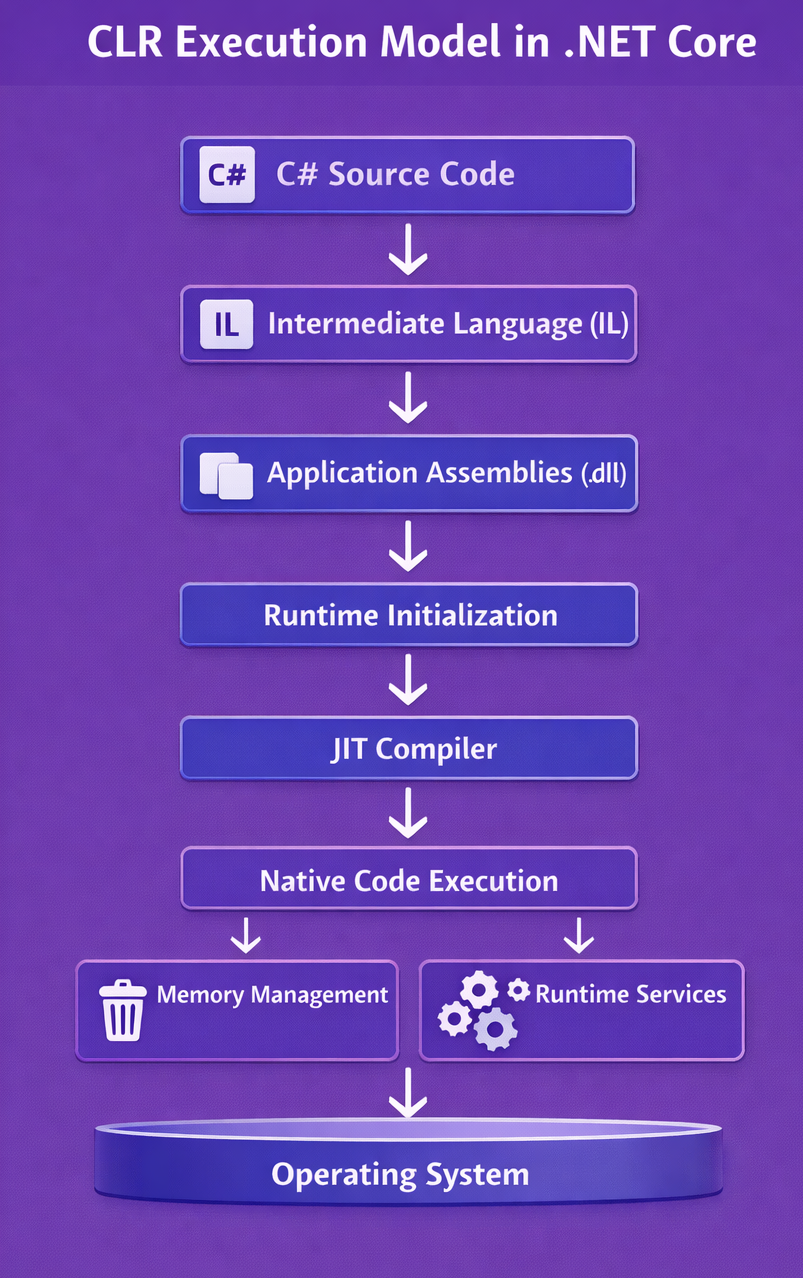
Each component has a well-defined responsibility.
CLR Execution Responsibilities
This section explains what exactly the CLR does at each stage of execution
Step 1 – Source Code Compilation (Build Time)Before execution begins, the developer writes C# source code, which is compiled into Intermediate Language (IL).
CLR Responsibility:At this stage, CLR is not executing yet, but it defines the runtime format (IL + metadata) that enables platform-independent execution.
IL allows:- Cross-platform execution
- Runtime optimization
- Safety verification
Step 2 – Application Startup & Runtime InitializationWhen the application is launched, CLR starts first, not the application code.
CLR Responsibilities:- Initialize runtime environment
- Set up memory management
- Initialize thread pool
- Prepare execution context
- Controlled execution
- Predictable startup behavior
- Safe runtime environment
Step 3 – Assembly Loading & Dependency ResolutionIn large systems, applications depend on dozens or even hundreds of libraries.
Without a controlled loader, version conflicts and runtime crashes would be common.CLR solves this through assembly isolation and resolution policies.
Example:
When your app starts:using MyCompany.Payment; using MyCompany.Logging;- CLR locates:
MyCompany.Payment.dllMyCompany.Logging.dll- Loads them into memory
- Verifies their metadata
- Ensures compatibility
Step 4 – IL Verification & Type Safety ChecksBefore executing any .NET Core application, the CLR performs a critical safety phase known as IL Verification and Type Safety Checks. This step ensures that the compiled code is safe, valid, and memory-secure before it is allowed to run.
When C# code is compiled, it becomes Intermediate Language (IL). IL is a platform-independent instruction set, but before execution, it must be verified by the CLR.
IL Verification ensures that:- Instructions are valid
- Stack usage is correct
- Memory operations are safe
- Type rules are respected
- No illegal jumps or memory access exist
In unmanaged languages (like C and C++):- Developers directly control memory
- Bugs can corrupt memory
- Invalid memory access can crash the system
.NET eliminates this risk by verifying every instruction before execution.
What Are Type Safety Checks?
Type safety ensures that:- Variables are used only as their declared types
- Method calls match method signatures
- Memory references are always valid
Step 5 – JIT Compilation (IL → Native Code)CLR uses the JIT compiler to convert IL into Native CPU instructions.
Example:
The first time this method is called:public int Multiply(int x, int y) { return x * y; }- CLR sends IL to JIT
- JIT generates native code optimized for:
- CPU architecture
- Cache layout
- Branch prediction
Step 6 – Native Code ExecutionOnce the JIT compiler converts Intermediate Language (IL) into native machine instructions, the program enters the actual execution phase. This is known as Native Code Execution.
At this stage, your application code is no longer running as IL — it is executing as pure CPU-level instructions, just like a C or C++ program.
Native code refers to machine instructions that the CPU understands directly.
Step 7 – Garbage Collection & Memory AllocationCLR manages all memory allocation and deallocation automatically.
CLR:- Allocates memory on the managed heap
- Tracks object lifetimes
- Frees unused memory
- Compacts heap when needed
Developers don't need to worry about manually allocating and deallocating memory.
Step 8 – Thread & Async Execution ManagementThe CLR manages threads and asynchronous execution to ensure applications run efficiently, responsively, and at scale. Instead of creating new OS threads for every task, the CLR uses a high-performance thread pool and intelligent scheduling.
This approach:- Improves performance
- Enables high concurrency
- Prevents thread exhaustion
What Happens Internally:public async Task FetchDataAsync() { await Task.Delay(1000); Console.WriteLine("Completed"); }- CLR assigns a thread from the thread pool
- While waiting, the thread is released
- When the delay completes, execution resumes efficiently
Step 9 – Exception Handling & Reliability ControlThe CLR provides structured exception handling to ensure applications fail safely, predictably, and in a controlled manner. Instead of abrupt crashes, runtime errors are converted into managed exceptions that preserve execution context and stack trace information.
This allows developers to:- Catch errors gracefully
- Log meaningful diagnostics
- Prevent application termination
- Build fault-tolerant systems
What CLR Does:try { int value = int.Parse("abc"); } catch (FormatException ex) { Console.WriteLine(ex.Message); }- Detects invalid operation
- Raises a structured exception
- Preserves call stack
- Transfers control to the catch block
This ensures reliable execution even during failure scenarios.
Step 10 – OS Interaction via Platform Abstraction LayerThe Platform Abstraction Layer (PAL) isolates operating system–specific behavior from application code, allowing .NET Core to run consistently across Windows, Linux, macOS, and containers.
Instead of calling OS APIs directly, applications interact with .NET APIs, which the CLR internally maps to the correct system calls for each platform.
Example:
What CLR Does:File.ReadAllText("data.txt");- Translates the file request into:
- Windows file APIs on Windows
- Linux file APIs on Linux
- Returns the result to the application
Conclusion: Role of CLR in .NET Core
The Common Language Runtime (CLR) is the foundation of modern .NET execution. It transforms platform-independent C# code into high-performance native applications, while enforcing strict safety, reliability, and memory guarantees.
By centralizing execution control, the CLR enables:- Cross-platform portability
- High-performance execution
- Automatic memory management
- Predictable runtime behavior
- Cloud and container readiness
In essence, the CLR allows developers to focus on business logic and system design, while the runtime handles execution complexity, performance optimization, and safety enforcement.